
Miss the good old days on your Nokia 3510 where the only features that could use up your storage space were Txt Msgs and Snake? Nowadays with the fast-paced, gigabite-busting technology of the smartphone, it’s hard to stay on top of your iPhone storage – especially with the never ending updates that come along. With the average operating system alone taking up around 5GB on recent smartphones, over 30% of a 16GB iPhone’s storage is instantly taken up. So here are some tips to help you free up some much-needed storage on your iPhone!
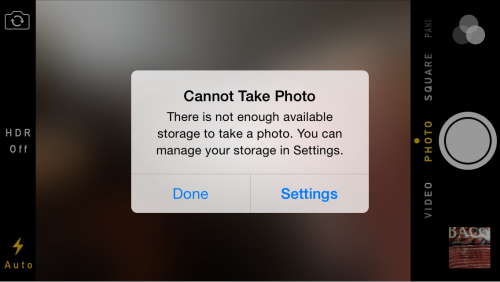
- HD Photos Whilst this incredible camera technology has allowed us to take much higher quality pictures, this also means they are a much bigger size and therefore take up much more memory on your phone – so just be aware of this when storing your photos. If you want to store lots of HD photos, then delete the standard version duplicates that automatically save in your phone – to do this go to ‘Settings > Photos & Camera > Keep Normal Photo’ and deselect this option.
- Regularly clean up your apps, data and cache. If you go to ‘Settings > Usage’ it will tell you what feature is using the most memory on your device. If you want to cut down your storage then regularly review these apps, refresh any of those that are cluttered, and cut down on apps you don’t use anymore by deleting them off your device. Deleting an app you no longer use could free up up to 500MB – 1GB. Also clear your Safari cache and History to save some space.
- Backup your Photos! Use an app such as Dropbox that ensure that all your photos are backed up on other devices that you set up to. By doing this you are then free to delete the photos off your iPhone camera roll but still keep the memories across all your devices whilst freeing up memory space.
- iBooks. If you like a good digitalised book, these can be costly for your iPhone storage. A way to get past this issue is to delete a iBook off your device when you have finished reading it and it will still remain in the cloud, meaning that you can always re-download it for free later if you fancy a re-read.
- Delete old messages! You can set it so that your phone will delete messages after a set time. By going to ‘Settings > Messages > Keep Message’ you can select how long you want your phone to store the message for before it is automatically deleted. This way your messages stay uncluttered and more storage is freed.
- Streaming music instead of saving it. MP3 apps that automatically save the music to your phone can result in a lot of used storage, instead use an app like Spotify that is good for streaming music without it greatly affecting your memory space.
There you go! We hope we have helped to free up some of your storage on your smartphone device. If you have any queries or need any help with your iPhone or smartphone then please get in contact with us here at iFixed. Book in with us online or give us a call on 01507 463230 for a hassle-free service!
